The Wobkey Crush80 keyboard has an incredibly stacked spec sheet for the price. In fact, it looks a little too good to be true. However, I’m happy to say that after testing it for a couple of weeks now, for both work and play, the Crush80 delivers in a big way. Here’s my review.
Premium weight
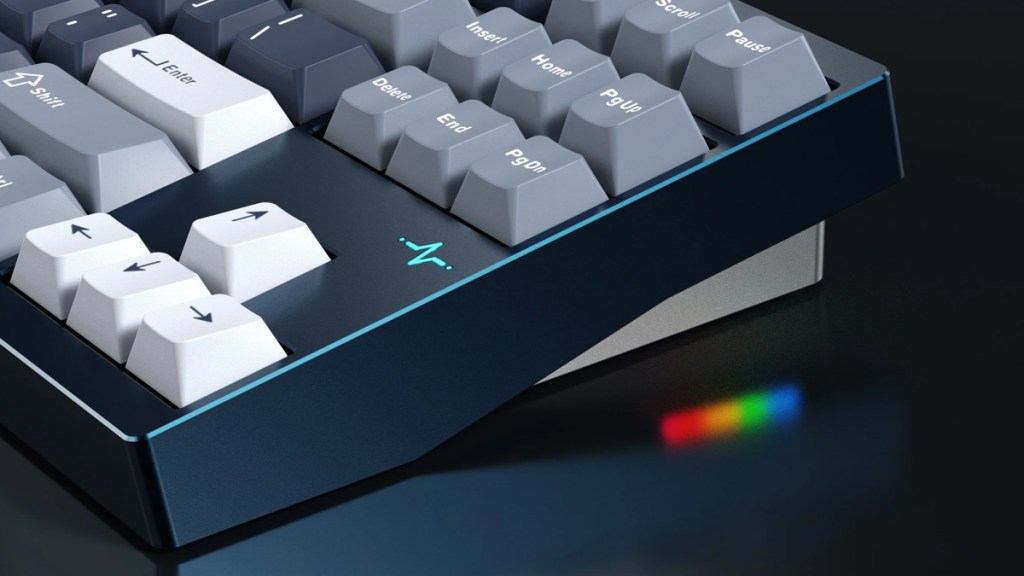
The unboxing experience is excellent and it’s great to see that Wobkey hasn’t skimped on bundled accessories. As for the keyboard, the first thing I noticed was the significant heft of the product, which oozes quality from the outset. Frankly, it feels like a weapon, with a CNC-machined aluminium case that looks terrific. It’s super clean on a desk and will be a talking point for those working in a shared space.
Within that aluminium housing is a layering of materials that help optimise typing feel and sound. Wobkey’s combination of foams and film, an FR4 plate, and a gasket-style structure combines into an impressive premium-style build.
Super smooth

The switches, Kailh Cocoa Linears, are superbly smooth. These sit below the PBT double-shot keycaps, which I have zero complaints about.
Not so long ago, this setup would have cost three times the amount, and you would have had to build it yourself, so this is a real win.
Make a connection

Connecting the Crush80 is made simple thanks to the three connectivity modes: wired, Bluetooth, and 2.4 GHz. If you do go for wireless, the high-capacity battery stands out with its high endurance.
The RGB lighting seems bright and the various modes are as subtle or as over-the-top as users would like. There’s even some additional RGB underglow, which will please lighting fans. Personally, I disable the lighting on my keyboards as I prefer a more minimal aesthetic and don’t often work or game in the dark.
No knob here

While the Crush80 does a heck of a lot right, there are some elements that could be improved. Firstly, there’s no rotary knob for controlling media playback or volume. This might not matter to some, but to others it would very well be a dealbreaker.
Also, while I view the weight of the keyboard as a positive, as it gives it an aura of high quality, those hoping to take the Crush80 on the go may want to rethink that. Again, this is a hefty keyboard that limits portability.
Disclosure: Review sample provided by Wobkey.
Final Verdict
At $169, the Wobkey Crush80 is a killer TKL keyboard that offers an impressive blend of build quality, performance, and features for the price. It isn’t perfect, and a few omissions will matter to some users, but the overall experience is hard to fault. As a result, it stands out as a strong option in an increasingly crowded market.
Positives and Negatives
-
Excellent build quality
-
Smooth linear switches
-
Strong value for money
-
Multiple connectivity options
-
Premium typing feel
-
Limited portability
-
No rotary knob